ShopDreamUp AI ArtDreamUp
Deviation Actions



Description
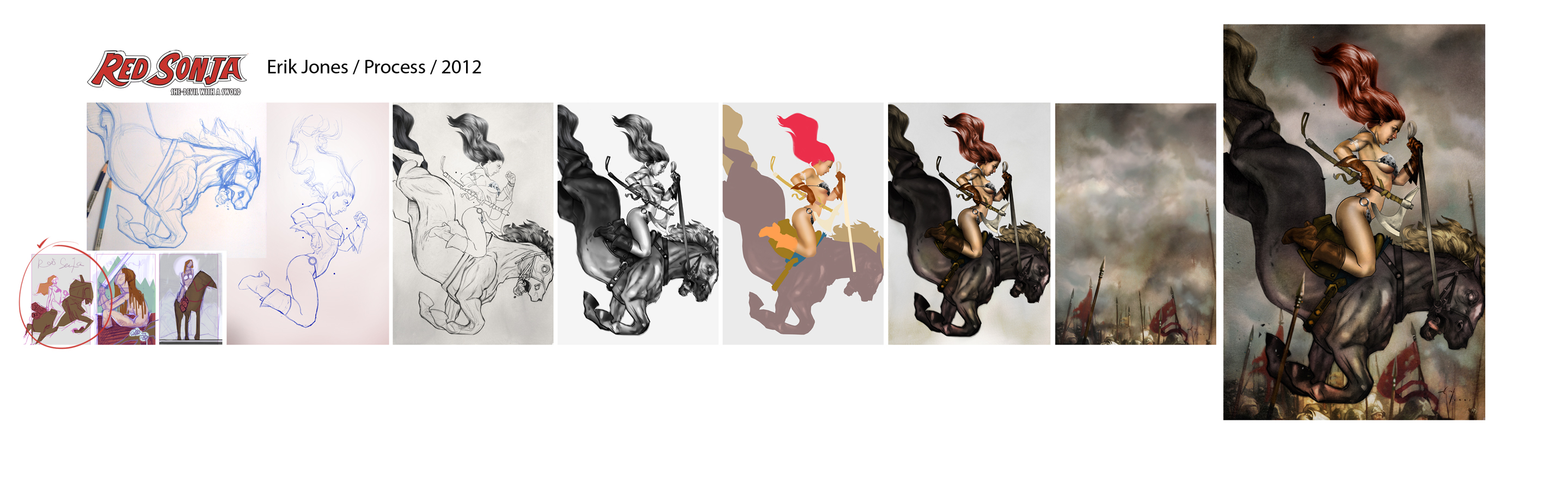
This post is showing my process for the latest Red Sonja cover.
I've included the 3 thumbnails I submitted in the beginning of the project. As you can see I took a few liberties with the one that was chosen but still stayed close to the original idea.
Most of the line drawing and value were done traditionally with pencil on bond paper and Rives bfk paper.
I drew a lot of it in sections and merged them together digitally.
Because the values in the drawing were so strong, it made it very easy to color. It is mostly flat colors with a bit of digital painting on top, also taking advantage of the Burn and Dodge tool in Photoshop.
The background was all digitally painted, then I added a bunch of scanned in textures on top. The final step was to flatten the entire image and refine values and add little bells and whiles here and there.
And there you have it!
I've included the 3 thumbnails I submitted in the beginning of the project. As you can see I took a few liberties with the one that was chosen but still stayed close to the original idea.
Most of the line drawing and value were done traditionally with pencil on bond paper and Rives bfk paper.
I drew a lot of it in sections and merged them together digitally.
Because the values in the drawing were so strong, it made it very easy to color. It is mostly flat colors with a bit of digital painting on top, also taking advantage of the Burn and Dodge tool in Photoshop.
The background was all digitally painted, then I added a bunch of scanned in textures on top. The final step was to flatten the entire image and refine values and add little bells and whiles here and there.
And there you have it!
Image size
2880x878px 1.04 MB
© 2012 - 2024 theirison
Comments46
Join the community to add your comment. Already a deviant? Log In
I really like how the ribs are colored, they look so real!! And cool perspective on her face, too 